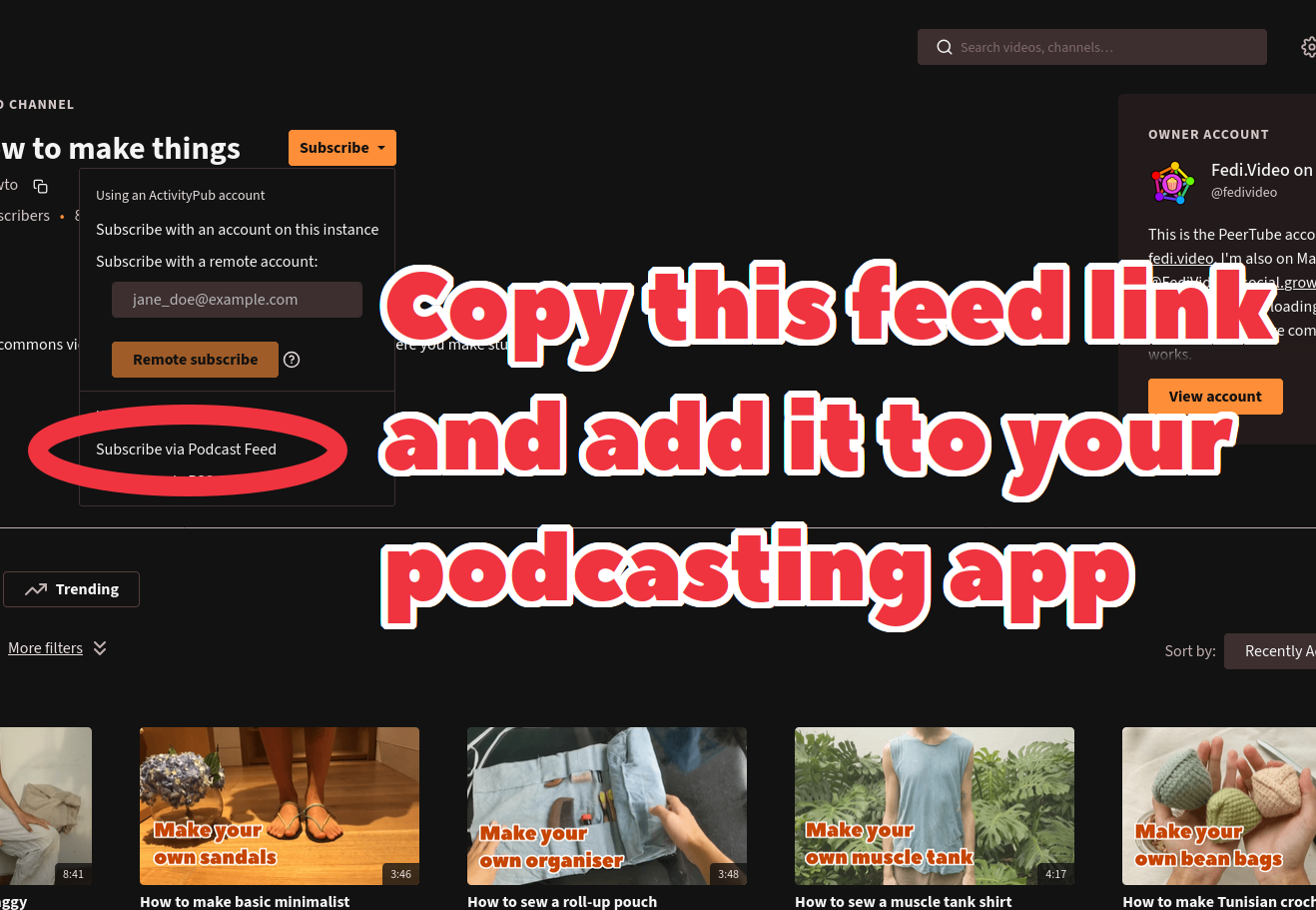
Every PeerTube channel has a feed link that can be subscribed to through most podcast apps such as AntennaPod, Apple Podcasts etc.
To subscribe via podcast apps, first you need to get the channel’s feed link:
- Go to a PeerTube channel’s profile page
- Click on the Subscribe button
- Copy the link from Subscribe via Podcast Feed option. If you’re using a phone or tablet, long-press and select Copy link. If you’re on a computer, right-click and select Copy link.
Once you’ve got the feed link, you can use it in your podcast app. Different apps will have different interfaces, but they should be broadly similar in how they work. Usually there will be a box for you to paste the feed link into.
As an example, here’s how to subscribe to a feed link in Apple Podcasts:
- Click on the Library tab at the bottom of the screen
- Click the ⋯ icon in the top right
- Select Follow show by URL
- Paste the feed link into the box, then click Follow
Does this work for video or audio podcasts?
Both! This works for both video and audio, as PeerTube lets people upload both video and audio files.
Can I listen to video episodes as just audio?
Usually yes, but it depends on the podcast app you’re using.
For example, in Apple Podcasts when you press play on a video podcast, the audio plays but the video is shown as a tiny preview (which you can expand to full screen if you want). You can even lock the screen which blanks it, but the audio will carry on playing.
Which podcast apps does this work on?
It should work on any podcast app that allows you to follow a podcast’s feed link. Different apps might call these links “URL” or “RSS” or “Feed” or “Syndication” or other terms, but they all involve the same process of pasting the link into the app.
Most podcast apps allow following podcasts by pasting links. On some podcast apps this may be the only method!
Is this for channels or accounts?
The channel page has a feed for just that channel, the account page has a feed that combines all of the account’s channels into one feed.
Can I download episodes to the podcast app to listen/watch offline?
Yes, if the uploader has enabled downloads. Just use your podcast app’s ordinary download function.
How do I promote my PeerTube channel to podcast app users?
There are two ways that podcast users can discover your PeerTube channel:
- Tell them what the feed link is for your channel and tell them how to manually add the feed link to popular podcast apps.
- Submit your PeerTube channel to podcasting catalogues including Apple Podcasts ⧉ and the Podcast Index ⧉, so that people don’t have to manually add the feed link. You may need to use slightly different feed links to do the submission, and there is a special section of PeerTube to provide the right kinds of submission feed links at Channels > Manage > Podcast. Note that Apple Podcasts requires submissions to be accompanied by a public email address.
I’m viewing a PeerTube account or channel from Mastodon, how do I find its feed link?
Go to the account or channel’s original page, which will take you to its profile page on PeerTube. Then follow the steps above.
Will this feed work on RSS news feed readers too?
The Subscribe button also contains a Subscribe via RSS option which is better suited to RSS feed readers.
Will podcast subscribers show on my channel’s subscriber numbers?
No. The subscriber number only shows people following you from the Fediverse (including other PeerTube accounts, Mastodon, Friendica etc). Podcast following works through passive feed subscription, it doesn’t send any kind of following data back to your server.
However, you should be able to get a rough idea about podcast subscribers from the number of downloads you are getting in PeerTube’s own statistics.